
Building Runtime-Aware JavaScript Packages
JavaScript makes it easy to share modules. Package managers like npm, pnpm, and yarn let
developers publish code and distribute it globally through CDNs like jspm. Other developers reuse
that code in their own projects. The open-source nature of many packages means the community
improves and updates them continuously.
JavaScript runs on multiple runtimes: browsers, node, deno, and mobile. Each runtime has its
own built-ins. The ecosystem needed standard practices for writing and distributing modules across
these environments.
Different standardising bodies govern various technologies. tc39 proposes changes to the JavaScript language. w3c and node-tsc handle standards for browsers and Node.js.
Example
fsis available in node, but not in browsers.document(DOM) is available in browsers but not in node.
These are runtime-specific built-ins, dependent on the environment. Since JavaScript runs everywhere, nothing stops a module written for browsers from being used in node or deno. Package authors started using polyfills. But bundling polyfills into the module itself has downsides.
Built-ins
Say you are building an authentication package for both browser and node. The polyfills approach creates problems:
node-fetchhandles fetch calls in node, but browsers already have a nativefetch. Bundlingnode-fetchmeans browser users download code they don’t need.- Each
npmpackage bundling its own polyfills bloats dependencies. Every module innode_modulesbrings its own copy, increasing build size. - If the modules skip polyfills, end users must install them manually.
Recent package specifications make building for different runtimes easier.
Imports #
Node v16 added import paths
mapping. You can define a
dependency that resolves differently depending on whether the module runs in browser or node.
A fetch can be mapped like this:
{
  "name": "@example/authentication",
  "type": "module",
  "imports": {
    "#middleware": {
      "node": "./middleware.js",
      "default": "./middleware-browser.js"
    }
  }
}
Implement for both environments using their built-ins or polyfilling where needed:
// middleware-browser.js
export const authenticate = () => {
  return fetch("https://example.com/authenticate");
};
// middleware.js
import fetch from "node-fetch";
export const authenticate = () => {
return fetch("https://example.com/authenticate");
};When consuming authenticate, import it from the mapped path:
import { authenticate } from "#middleware";The runtime resolves to the correct module. This eliminates polyfill duplication and uses native modules where available.
Example
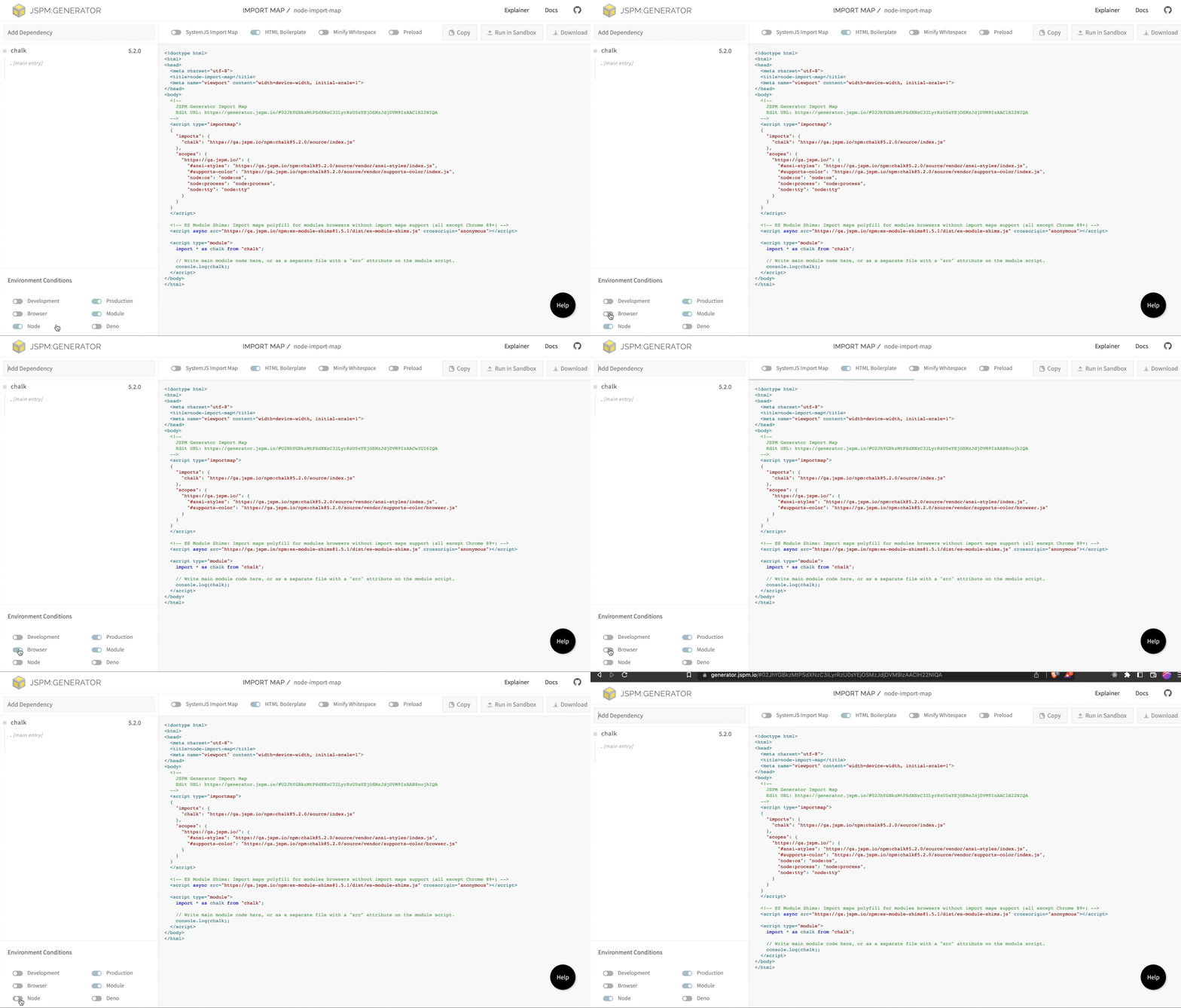
chalk, one of the most used packages, uses imports to load built-ins efficiently.
Here is imports from its package.json:
"imports": {
  "#ansi-styles": "./source/vendor/ansi-styles/index.js",
  "#supports-color": {
    "node": "./source/vendor/supports-color/index.js",
    "default": "./source/vendor/supports-color/browser.js"
  }
}
https://ga.jspm.io/npm:chalk@5.2.0/source/vendor/supports-color/index.js
https://ga.jspm.io/npm:chalk@5.2.0/source/vendor/supports-color/browser.js
Exports #
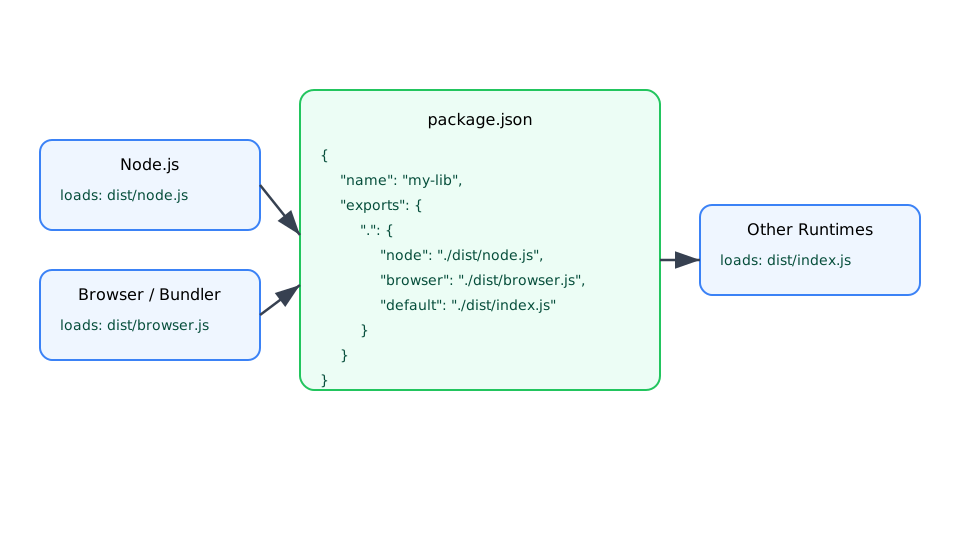
The exports field in package.json lets authors specify how their package should be imported in
different environments. It defines different entry points for different runtimes (browser, node,
default) and different formats (CommonJS or ES modules) for the same entry point.
imports and exports serve different purposes. imports maps runtime-aware external packages
into your module. exports exposes your module across runtimes and formats.
Preact’s package.json shows a good example of exports:
"type": "module",
"exports": {
  ".": {
    "types": "./src/index.d.ts",
    "browser": "./dist/preact.module.js",
    "umd": "./dist/preact.umd.js",
    "import": "./dist/preact.mjs",
    "require": "./dist/preact.js"
  }
}
umd is not a standard field in the specification.
WinterCG, the collaboration platform for different JavaScript runtimes, is standardising these runtime keys. The specification proposes more identifiers for different runtimes. This optimises packages by leveraging built-ins available in the target runtime and polyfilling only what’s needed.
ENV #
process.env.NODE_ENV is standard practice for distinguishing production and development builds
in applications. For libraries, this breaks. process is not a browser built-in.
Library authors need to serve different versions for different build targets: better error messages in development, smaller builds in production. Loading these modules in browsers from CDNs crashes script execution.
react-router@5.2.0 fails when loaded as an ESM module in the browser because its entry uses
process.env.NODE_ENV:
https://unpkg.com/browse/react-router@5.2.0/index.js
// react-router/index.js
if (process.env.NODE_ENV === "production") {
  module.exports = require("./cjs/react-router.min.js");
} else {
  module.exports = require("./cjs/react-router.js");
}
Importing process from node:process fixes this. Bundlers and CDNs detect the built-in usage and
polyfill accordingly:
const process = require("node:process");

if (process.env.NODE_ENV === "production") {
  module.exports = require("./cjs/react-router.min.js");
} else {
  module.exports = require("./cjs/react-router.js");
}
Explicit built-in references give bundlers precise control over what to polyfill, instead of polyfilling all node built-ins for every browser build.
This pattern only works in CommonJS. Use conditional exports and imports for branching instead of relying on code analysis.
JSPM #
The ESM transition broke many build pipelines. Projects needed a combination of bundlers,
transpilers, node, and multiple module formats. Loading a cjs module from npm into an ESM
project, or vice versa, left most systems out of sync.
JSPM builds all packages from npm ahead of time into spec-compliant ESM modules. It serves them
through a distributed global CDN, regardless of the format in which packages were published to npm.
Any module from npm loads in any project.
package.json
Different fields inside package.json control module resolution and runtime compatibility.
browser
When a package specifies a
browser field, JSPM uses it
instead of main when generating import-maps for browser targets. The package author explicitly
states which module to use in browser environments.
module
JSPM detects module builds. If main points to a CJS build and module points to an ESM version,
and neither type: "module" nor .mjs extension is set:
"main": "dist/index.js",
"module": "dist/index.es.js"
JSPM treats main as ESM. This happens because module is not an official specification, only
popularised by bundlers.
Rely on specifications. The
exportsfield now exposes multiple build formats. Stop usingmodule. You don’t needmainif you expose the package using exports.
exports
JSPM’s package-builder parses packages and creates an export-map for those that don’t expose one.
It detects subpaths based on internal
import usage, making exports more efficient. If a package already exposes an exports map, JSPM
uses it instead of regenerating.
"exports": {
    ".": {
      "import": "./dist/default/lib.mjs",
      "require": "./dist/default/lib.js"
    }
}
react-router from unpkg:
https://unpkg.com/browse/react-router@6.8.2/package.json
  "main": "./dist/main.js",
  "unpkg": "./dist/umd/react-router.production.min.js",
  "module": "./dist/index.js",
  "types": "./dist/index.d.ts"
All these fields are deprecated in favour of exports.
The same package from JSPM:
https://ga.jspm.io/npm:react-router@6.8.2/package.json
"exports": {
  ".": {
    "module": "./dist/index.js",
    "default": {
      "development": "./dist/dev.main.js",
      "default": "./dist/main.js"
    }
  },
  "./package.json": "./package.json.js",
  "./package": "./package.json.js",
  "./dist/main.js": {
    "development": "./dist/dev.main.js",
    "default": "./dist/main.js"
  },
  "./dist/index.js": "./dist/index.js",
  "./dist/main.js!cjs": "./dist/main.js",
  "./dist/dev.main.js!cjs": "./dist/dev.main.js",
  "./package.json.js!cjs": "./package.json.js"
}
These export maps load modules through import-map. The next post explores how import maps load
modules into any environment.